



Starting today, Shopify merchants in the US and Canada can display calculated USPS and Canada Post shipping rates to customers through Shopify Shipping. With calculated shipping, you won't have to manually enter estimated flat rates for all the places you ship, and you'll always charge the right amount for shipping.
Calculated shipping is free and available on all plans for all merchants using USPS and Canada Post rates at checkout.
Learn more about Shopify Shipping
When customers checkout from your store, they'll now see accurate shipping rates based on order weight, package dimensions, and shipping destination:
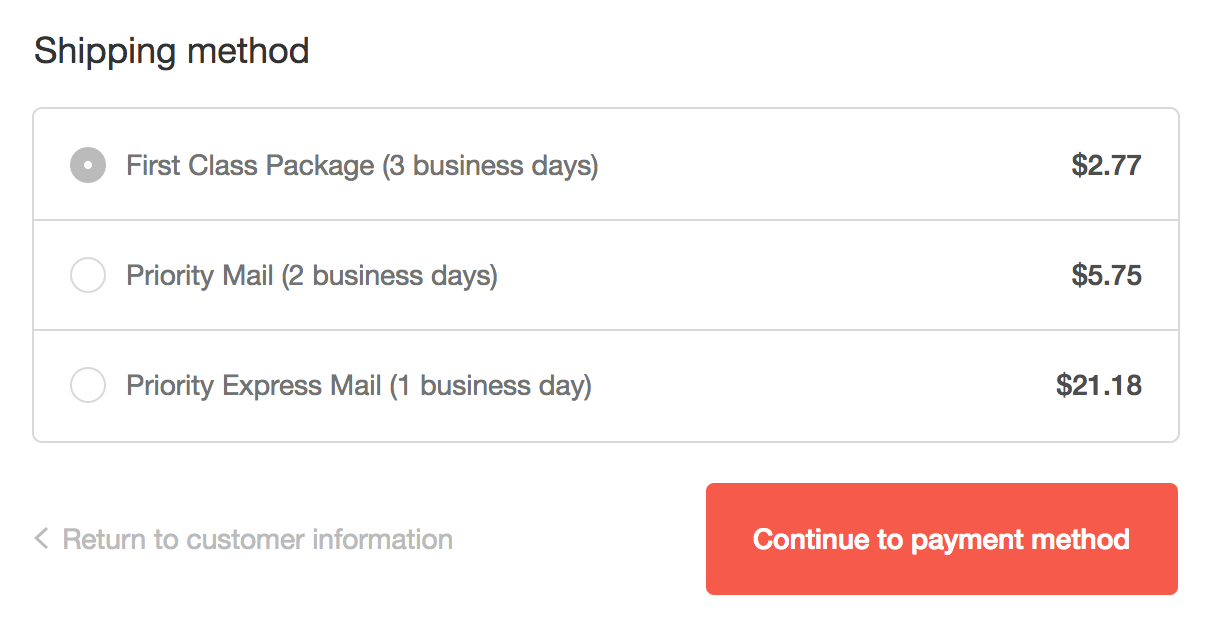
The shipping rates your customers see at checkout are Shopify's discounted USPS and Canada Post rates, and are cheaper than the rates you’d get at the post office. As of today, you can choose to pass on those savings directly to your customers.
Avoid overcharging and undercharging on shipping
Shopify stores overcharge for shipping 80% of the time when setting rates manually, which increases the risk of abandoned carts. Showing accurate shipping costs can boost your store’s credibility during checkout, and help improve sales. By offering a range of delivery methods you can provide greater choice for your customers, and encourage them to come back and buy again.
Learn more: Find out how to choose the perfect third-party logistics (3PL) shipping provider.
Ship internationally with confidence
Using calculated rates will also reduce the amount of time you spend researching international shipping costs. You can trust that the best possible rate will always be shown to your customers, so there’s less risk of losing money on international orders. Now you can ship anywhere worldwide, and be confident that you, and your customers, will always get the best, most accurate shipping rates.
Save money and skip the lines at the post office with printable shipping labels
With Shopify Shipping, you can also buy shipping labels to print at home or at the office. These labels will reflect the same discounted rates that were displayed to your customers at checkout. Your customers will receive a tracking link so they can check the status of their shipment anytime.
Learn More: Everything You Need to Know About ePacket Shipping
To print a shipping label, simply log into Shopify, choose an order to fulfill, click “Buy shipping label” and print.
How to offer calculated rates in Shopify
If you’re already using Shopify, you can start showing calculated rates to customers by updating your shipping zones. Be sure your products all have proper weights listed in their descriptions to get the most accurate rates. If you’re located outside of US or Canada, or if you’d like to display third-party calculated rates (from FedEx, UPS, or other Shopify apps), you’ll need to upgrade to the Advanced Shopify plan.
If you’re looking for a primer on how to streamline fulfillment and the best ways to ship your products, visit the Shopify Shipping 101 guide or the Shopify Help Center.
See our guide on epacket for exporting to China.
Read more
- Shopify Shipping Services- Offer Affordable and Convenient Shipping for You and Your Customers
- How to Create Your Shipping Policy (With a Template and Examples)
- Best Ecommerce Shipping Solutions for Your Business (2024)
- The 9 Best Dropshipping Websites for Your Online Store
- The Ultimate Guide To Dropshipping (2024)
- How to Sell on Instagram with Instagram Shopping
- The 13 Best Dropshipping Suppliers in 2024
- Ecommerce International Shipping- Guide to Delivering Worldwide
- Introducing Store Checkout On Your Own Business Domain
- Early Access- Shop Product Reviews For Building Brand Equity

