

 Shopify blog



Staying on top of inventory management is increasingly important for brands with multiple stores and a multichannel approach to sales.
According to Wasp Barcode, 46% of small businesses either don’t track inventory at all or do so manually. If you’re using inventory management software in your retail business, you’re already on the right path.
Once you’ve implemented the right tools though, it’s up to you to put workflows and automations in place to make your software work proactively for you. One way to do that is with stock alerts.
Below, we’ll look at what stock alerts are, why they’re important, and how you can use them both internally and on the marketing side of your retail business.
What are stock alerts?
Stock alerts, also referred to as inventory alerts, tell you when there has been a significant or noteworthy change in your level of inventory. Many businesses leverage low-stock alerts, but there are other types as well, including alerts for:
- New shipments
- Slow-moving stock
- Bulk or large orders
- Inventory reorder point
Which alerts are best for you will depend on the nature of your product, business, and retail operations.
A lot of inventory management software has a stock alert feature. Typically, a notification is sent to a specific individual, or group of individuals, when an item meets the parameters set for a given alert.
FURTHER READING: Having the right tools in place can simplify monitoring your stock levels. Read up on the tools retailers can use to make inventory management easier.
Value of stock alerts
Running out of stock, either due to under-ordering or inventory shortages, is a very real and costly issue retailers face. In fact, businesses lose $1.75 trillion per year to out-of-stocks, overstocks, and returns.
Consider this: Almost a quarter of Amazon’s retail revenue comes from shoppers who attempted to purchase a product in-store, but couldn’t find it in stock. Stock alerts are designed to help retailers avoid this problem.
Inventory alerts are valuable beyond helping keep items in stock. They also reduce a lot of susceptibility to human error and time constraints by automatically keeping you apprised of impactful changes in stock levels.
Optimizing inventory levels helps you become more profitable, use warehouse and storage space more effectively, and reduce holding costs or missed sales.
If you’re managing online and offline channels, multiple store locations, or both, stock alerts can help you ensure every location has enough stock on hand to meet demand–these alerts can be particularly important for businesses using just-in-time inventory.
TRY SHOPIFY POS: Need help tracking stock levels at your warehouse, stores, and online? Try Locations for Shopify POS to seamlessly manage inventory across all your retail operations.
4 ways to use stock alerts in your retail business
Maintain operational control
Stock alerts help your team stay in control logistically. Fewer last-minute orders and more automated systems create seamless retail operations and help your team more effectively manage stock.
Meaghan Brophy, senior retail analyst at FitSmallBusiness.com, recommends using a higher quantity for your low-stock alert.
“If your low-stock alert tells you a product is low when there’s one left, unless you pay for rush shipping on your new order, you may still experience a stockout,” she says.
Brophy also suggests using a higher threshold for your most popular and fastest-selling items, as well as items you frequently run out of. If reordering frequently is too expensive, consider negotiating a better price with your supplier for bulk orders.
“Many suppliers will offer discounts for bigger orders,” says Brophy. “That’s a great opportunity to boost your margins and gain even more profit from your best-selling items.”
Know when to raise or lower prices
A lot of low-stock alerts for particular products can indicate it’s a good time to raise prices. At the same time, a stock alert for aging inventory could mean it’s time to run a promotional discount.
This approach has worked well for Misha Kaura, who owns an eponymous fashion brand and frequently uses pop-up shops to connect with customers in person. Kaura’s customers have a small window of opportunity to buy her products—she only makes 800 of each dress in her ready-to-wear collections and just four in her made-to-measure collections—one reason she has used low-stock alerts since starting her business.
“I’m running a luxury business, and I want to limit overexposure,” Kaura says.
As a result, I actually increase the prices when the stock is low because, at that point, it’s on the verge of being a collector’s item.
Stay organized during busy selling periods
Busy selling periods, whether the winter holidays or another seasonal surge, pose great sales opportunities but also bring logistical challenges. Unpredictable demand, higher volume, and temporary employees who don’t quite know the ins and outs of your business are just a few contributions to the chaos of these times.
These periods come and go quickly, so it’s important to be able to react to the opportunities they provide just as quickly. Stock alerts can help you stay apprised of fluctuations in inventory so you can develop promotions, pricing, and merchandising for slow-moving stock, giving your buying team some breathing room for fast-moving items.
United By Blue implemented low-stock alerts for the first time prior to 2018’s Black Friday Cyber Monday season. As a result, the retailer was able to inform online shoppers of items that were running low, which helped bring customers into United By Blue’s physical store to look for items that were sold out online.
Drive sales
As in the last example, you can leverage stock alerts as a marketing tactic to drive sales, both online and in-store.
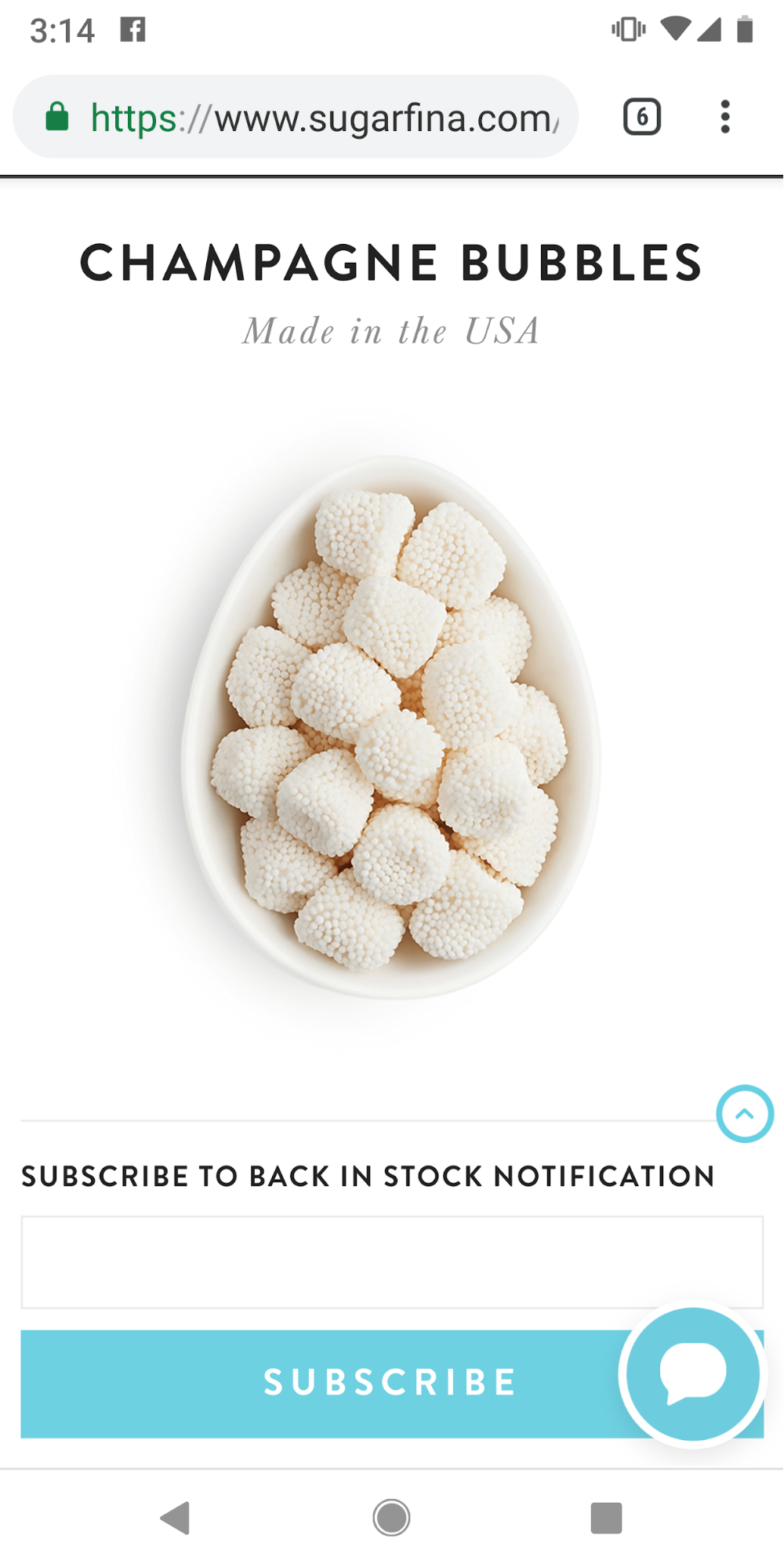
Luxury candy brand Sugarfina allows customers visiting its website to sign up and receive in-stock alerts so they can learn when an item’s inventory is replenished and available for purchase.
 You can apply this tactic in-store, too. “When there are only a few [items] left, hype them up in store as a ‘Last Chance’ or ‘Almost Sold Out!’ product,” says Brophy. “Shoppers respond to scarcity, especially in-store, where they’re more likely to make an impulse purchase.”
FURTHER READING: Learn 10 more tactics to encourage your customers to make impulse purchases.
Using stock alerts on Shopify POS
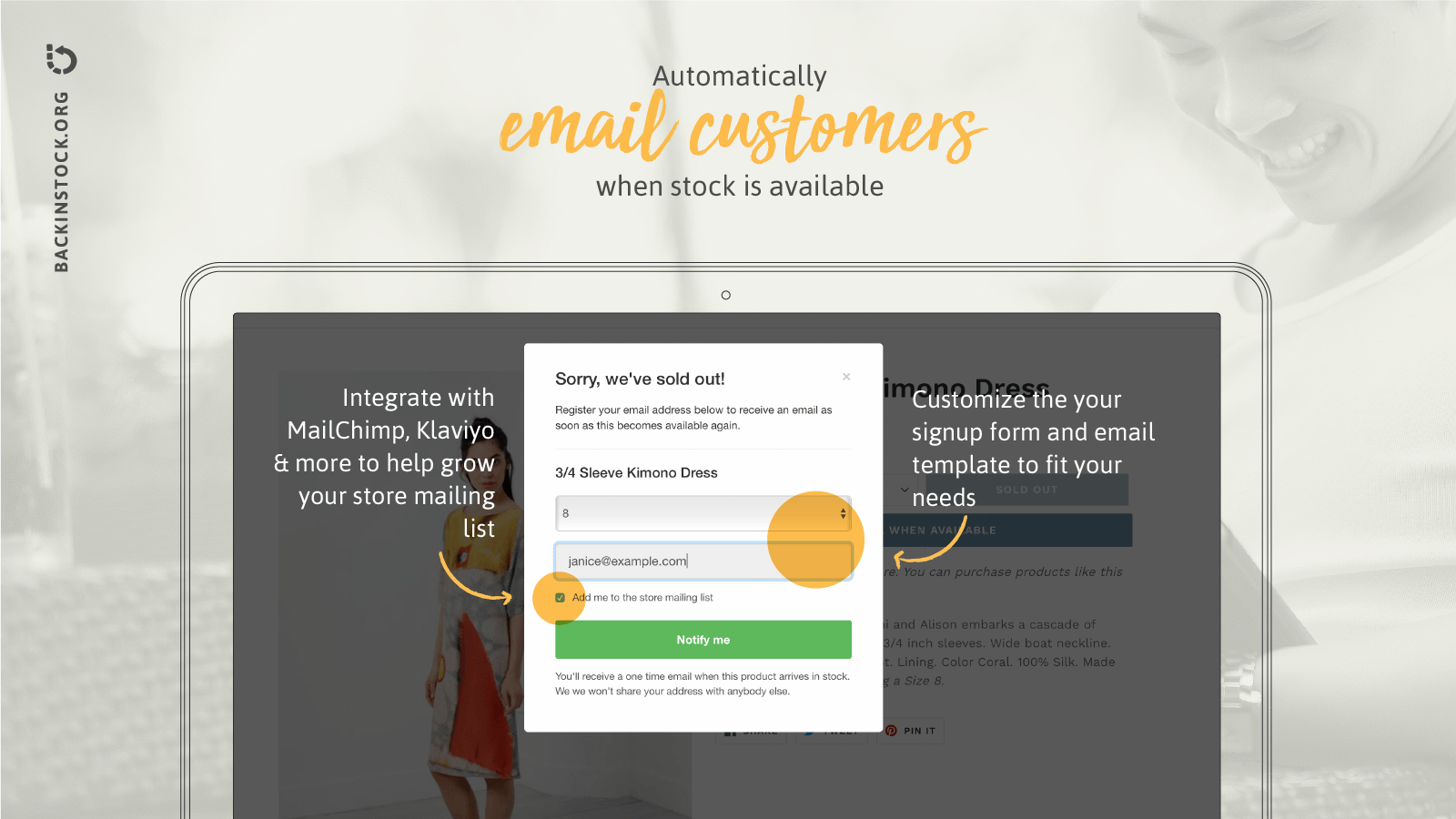
While Shopify POS makes managing inventory across multiple locations easier for retailers, merchants also have access to a wealth of third-party tools to track specific products and automate stock alerts.
To integrate stock alerts and similar automations into your retail operations, check out the following apps in the Shopify App Store:
- Low Stock Alert: As the name suggests, this app allows retailers to automate stock management tasks like notifications for low-stock products and daily emails detailing all low-stock items.
- StockBot: This bot has a brain for inventory. Retailers can use StockBot to set up customized alerts. Get emails hourly, daily, or weekly with details on low-stock items. And you can track stock levels of specific products, variants, or even entire collections.
- Back in Stock: For those tough times when inventory does run out, this app allows customers to sign up for notifications for that particular item. When that product is restocked, the app automatically emails interested customers.
- Now Back in Stock: Similar to Back in Stock, this app sends automated notifications to customers about restocked items. But with this specific tool, customers can opt to receive their notification via email, SMS, or push alert.
Moving forward with stock alerts
Stock alerts are a great way to stay on top of inventory and create more profitable marketing and pricing strategies. Automated alerts can keep you and your team on track, and help you to prevent costly stockouts.
Read more
- The Retailer’s Guide to the Weighted Average Cost Method
- What Causes Shipping Delays? How They Impact Retailers and How to Deal With Them
- A Simple Guide to Inventory Audits for Retailers
- 8 Benefits Of Outsourcing Order Fulfillment for Your Retail Business
- Diversify Your Offerings: Takeaways From 5 Service-Based Businesses Turned Retailers
- The Complete Guide to Purchasing Product Samples
- Demand Planning for Retailers: How to Prepare for an Influx of New Shoppers
- How to Calculate the Value of Your Inventory
Shopify Inventory Alerts FAQ
Does Shopify have a built-in low-stock alert feature?
Shopify's core admin does not include a native low-stock alert feature, so notifications require an add-on. Merchants who need direct notifications of low stock levels can install an inventory alert app from the Shopify App Store, or use Shopify Flow to set up low stock notifications. Flow lets you build a custom workflow that triggers an email or message once stock drops below a chosen level.
How do I calculate the right low-stock alert threshold?
Set a threshold using your reorder point, which is calculated from your average daily sales and your supplier's lead time. Reorder points are automatically calculated using lead time and number of sales per day, so selling 5 units a day with a 10-day supplier lead time means the low-stock warning triggers at 50 units remaining. Add extra units for unpredictable suppliers or your fastest-selling products to build in a safety margin.
What channels can I use to receive Shopify stock alerts?
Stock alerts can reach you through email, SMS, push notifications, or team chat tools, depending on the app you use. Several inventory apps deliver low stock alerts via email or Slack, while others send notifications through Email, Telegram, Slack, Discord, and Pushover. Email suits routine digest-style summaries, while Slack or SMS works better for urgent, time-sensitive thresholds that need immediate action.
What's the difference between low-stock alerts and back-in-stock alerts?
Low-stock alerts are internal notifications that tell staff when inventory drops below a set threshold, prompting a reorder before a stockout occurs. Back-in-stock alerts are customer-facing instead, letting shoppers sign up to be notified the moment a sold-out item becomes available again. One protects your supply chain from running dry, while the other helps recover sales you might otherwise lose to a competitor.
Are stock alerts sent in real time or on a schedule?
Stock alerts can trigger instantly the moment inventory crosses a set threshold, or arrive as scheduled digests at intervals you choose. Alerts are typically sent in real time or at scheduled intervals, depending on how frequently you want to receive them. Instant alerts suit fast-moving, high-demand products where any delay risks a stockout, while scheduled summaries work better for routine checks across large catalogs.
Are there free apps for Shopify inventory alerts?
Several inventory alert apps offer a free tier for smaller catalogs before requiring an upgrade. A free version is available for shops with less than 250 SKUs, with paid plans unlocking higher SKU limits and more advanced features as a store grows. Free tiers commonly support email notifications, and some extend to messaging platforms at no extra cost, making them a low-risk starting point.


